In this article
- What Thumbtack itself says about reply speed
- The four options, side by side
- What each option does with a lead
- When each one wins
- What a flat fee versus a per-lead fee actually means
- Two things people forget to compare
- What no option can do
- Frequently asked questions
- People also ask
- Sources
- See what it does on your own leads
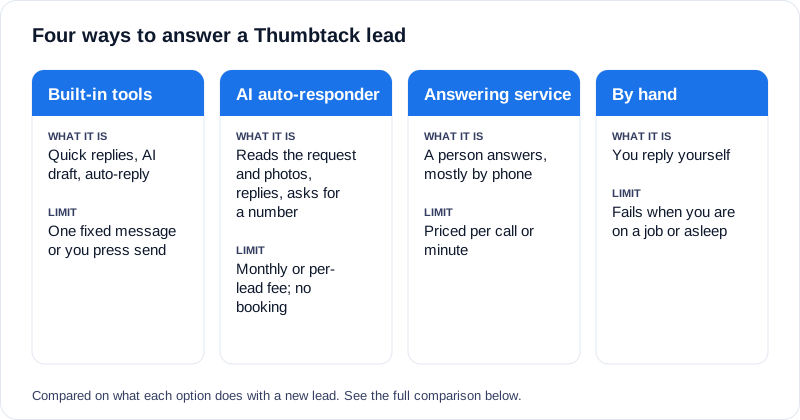
There are four realistic ways to answer a new Thumbtack lead: Thumbtack’s built-in tools (including its auto-reply, called Instant Reply), an AI auto-responder, a human answering service, or replying by hand. Instant Reply sends one fixed message you wrote in advance, an AI auto-responder reads the lead and writes a reply to it, an answering service puts a person on the phone, and replying by hand costs nothing but only works when you are free. Which one fits depends on your lead volume, your hours and how many of your leads carry photos. Details below are checked as of September 2026.
One number frames the choice. In our own data of 1,275 Yelp and Thumbtack leads, 46% of Thumbtack leads arrived with photos attached (257 of 556 Thumbtack leads; measured August 2026). A reply that cannot see those photos is a reply written blind for close to half of your Thumbtack leads. The full breakdown is in our data on lead photos.
If you already know you want automation, the Thumbtack auto-responder page covers how ours works. This article is about deciding whether you need one.
What Thumbtack itself says about reply speed
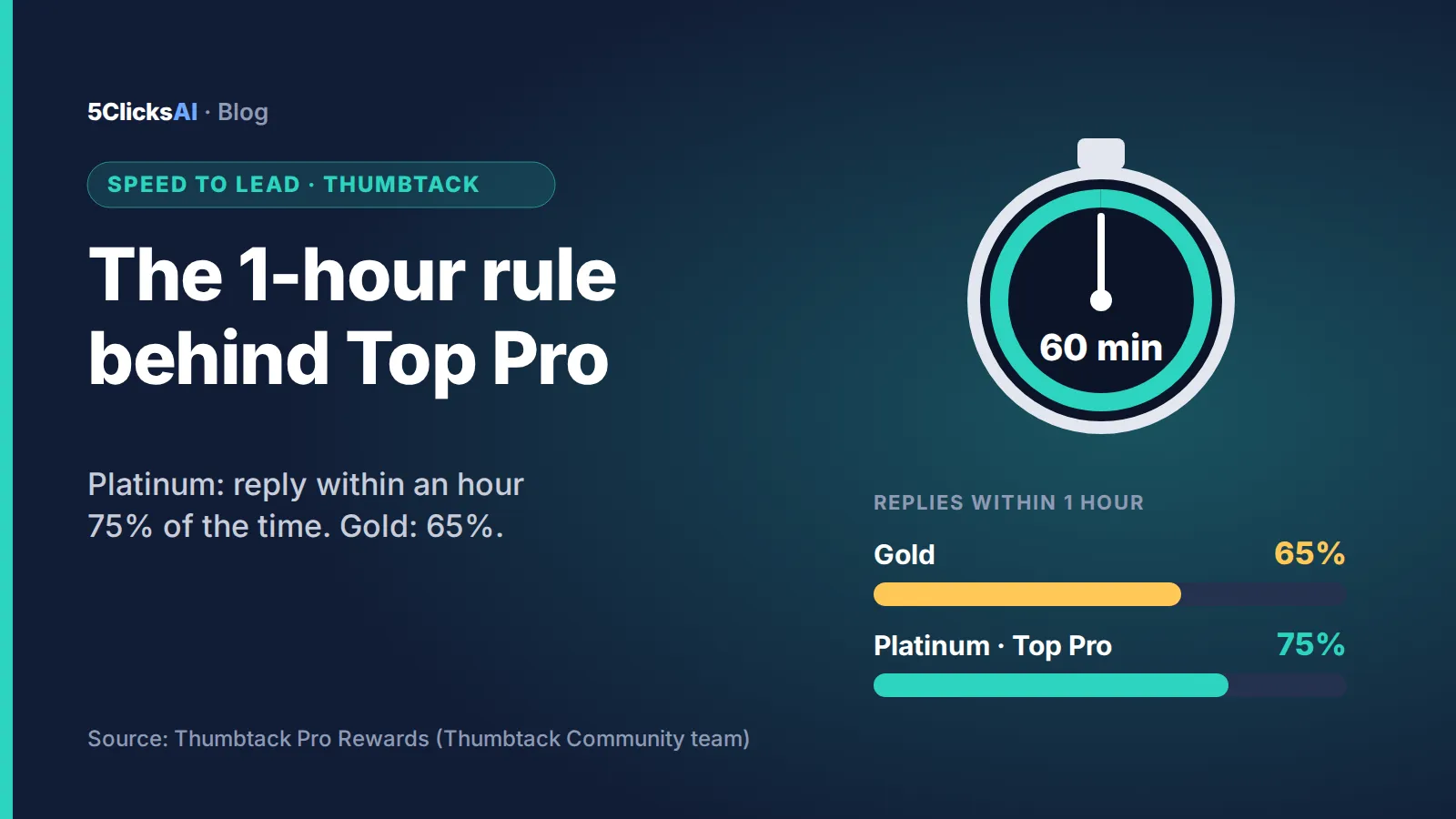
Thumbtack’s own help center is direct about it (as of September 2026; the one-hour metric is explained in Thumbtack response time and Pro Rewards):
- It advises pros to aim to respond within four hours, between 8am and 8pm local time, and says “the sooner the better.”
- It says response rate affects your rank in search results, and that responding quickly helps your rank so you are seen more often.
- It says acting on each lead affects your response time even if you are not interested, and asks pros to decline jobs they will not take so the customer can keep looking.
- Its Performance dashboard shows your response time and how you compare with competitors.
Those are Thumbtack’s statements about its own platform, and they are the reason reply speed is not just a courtesy. What no third-party tool can do is change how Thumbtack ranks you; a faster reply is behavior that Thumbtack says it rewards.
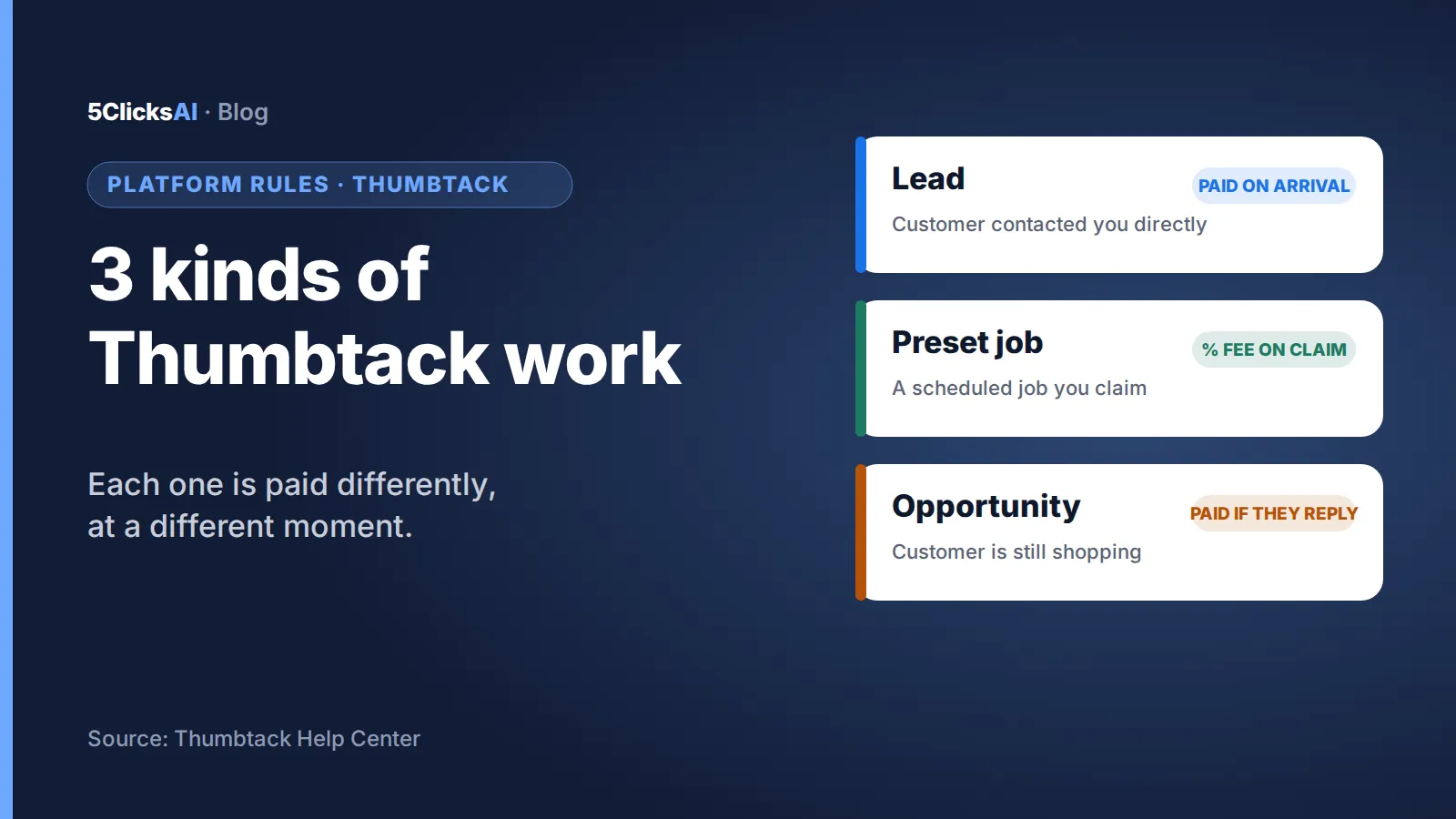
For how leads, preset jobs and opportunities are charged, see how Thumbtack leads work.
The four options, side by side
- Thumbtack’s built-in tools. Thumbtack gives you three: quick replies (reusable messages you send yourself), an AI-drafted reply that Thumbtack says it prepares “in seconds” from the customer’s request and that you send yourself, and an auto-reply (also called Instant Reply) that sends one message you wrote in advance the moment a lead arrives. The auto-reply is free and quick to set up, but it does not read the lead, so every customer gets the same text, and it cannot ask about the job, follow up, or start a call.
- AI auto-responder. Software that reads the customer’s message (and, in our case, the photos), writes a reply to that specific request, asks for a phone number, and alerts you when the customer is ready. It costs a monthly or per-lead fee, and it does not book jobs or quote prices for you.
- Human answering service. A person answers for you, usually by phone, sometimes by chat. It handles calls well and copes with unusual questions, but it is priced per call or per minute, varies a lot by provider, and is rarely built around the way Thumbtack leads arrive.
- Replying by hand. Free, and the most personal. It fails exactly when you are on a job, driving, or asleep, which is when a large share of leads arrive.
What each option does with a lead
- Speed to first reply: Thumbtack’s auto-reply and an AI auto-responder answer within seconds; an answering service depends on staffing; by hand depends on you.
- Reads the specific request: only the AI auto-responder does; a human service reads it only if the agent has it in front of them.
- Reads photos: only an AI tool built to do it; ours reads them at the moment the lead lands.
- Asks the job’s key details and a phone number: AI auto-responder and human service; Thumbtack’s auto-reply cannot.
- Follows up if the customer goes quiet: AI auto-responder and human service; Thumbtack’s auto-reply does not.
- Nights and weekends: Thumbtack’s auto-reply, AI auto-responder and answering service; by hand rarely.
- Books the job or quotes a price: none of the automated options should; that stays with you.
When each one wins
- Thumbtack’s built-in tools win when you get few leads and simple jobs. If a fixed “Thanks, I’ll call you shortly” is all a customer needs, and you are usually free to call back within minutes, the free tools do the job, and the AI-drafted reply helps when you are at your phone.
- Replying by hand wins when you are at your phone all day. A dispatcher or an owner who sees every notification will answer better than software.
- An answering service wins when most of your customers prefer to talk. If your trade is call-driven (locksmith, urgent plumbing), a human on the phone handles the emotional, urgent conversations.
- An AI auto-responder wins when leads arrive while you are unavailable and many of them include photos or a detailed description. It is the option that improves the first reply itself rather than only its timing.
What a flat fee versus a per-lead fee actually means
The price model is a real difference between AI auto-responders. LeadWinner, one competitor, publishes a price of $2.99 per lead with a 7-day free trial (their public page, checked September 26, 2026), and also lists weekly plans with lower per-lead prices at higher volume. 5clicks.ai charges a flat monthly price per connected Yelp or Thumbtack page: Starter $99 a month for up to 50 leads, Pro $297 for up to 500, Enterprise $499 for unlimited, with a 7-day free trial and no contract.
A break-even calculation is simple, and it favors whichever is cheaper at your volume:
- $99 divided by $2.99 is about 33 leads per month. Below that, a pure per-lead price is cheaper on paper. Above it, a flat fee is cheaper, and the gap widens as volume grows.
- Per-lead pricing also costs nothing in a quiet month; a flat fee keeps billing. If your lead volume swings a lot with the season, weigh that.
- Compare the price against your average job value, not against the fee alone. If the average job is a few hundred dollars, one extra booked job pays for a month either way.
We are the flat-fee option here, so treat our side of that comparison as one input, and check the numbers with each provider’s current page before you decide.
Two things people forget to compare
Photos. If your trade sees a lot of visual damage (roofing, appliance repair, water damage), a text-only reply will miss information the customer already sent. Ask any tool whether it reads attachments at the moment the lead arrives, because some links expire quickly on Yelp.
Phone calls. Long message threads rarely close a job. The tools that move the conversation to a phone call fast tend to win. Ours has a two-way call initiation option: when a customer writes, we call you and connect you with them live. LeadWinner lists a similar two-way auto-call. Whatever you choose, check that a call is actually part of the flow.
What no option can do
- No tool should promise that you win the job. The customer picks a pro, and a fast reply only puts you in the conversation.
- No tool changes how Thumbtack ranks or shows you.
- An automated reply cannot see your calendar, so it should never confirm a time slot; if it does, be suspicious.
Frequently asked questions
Is Thumbtack’s built-in auto-reply (Instant Reply) enough on its own?
For low volume and simple jobs, it can be. It sends the same fixed message to every lead, cannot read the request or photos, and cannot follow up, so it stops helping once customers compare several pros or ask specific questions.
Does an AI auto-responder replace me?
No. It replies, collects the customer’s phone number and key details, and hands the conversation to you by text and call. Pricing and scheduling stay with you.
How many leads do I need before a flat monthly fee makes sense?
Against a $2.99 per-lead price, the break-even for a $99 monthly plan is about 33 leads a month. Below that a per-lead model is cheaper; above it a flat fee is.
Is an answering service better than an AI tool?
If most of your customers want to talk and your jobs are urgent, a human on the phone is often better. If leads arrive as messages with photos, an AI tool that reads them fits the format better.
Can I use Instant Reply and an AI auto-responder together?
Check Thumbtack’s current settings and terms for your account. A fixed message followed by a second, different message from another tool may read as repetitive to the customer.
People also ask
- Does Thumbtack have a built-in auto reply? Yes, it sends one fixed message you write in advance; Thumbtack also offers quick replies and an AI-drafted reply that you send yourself.
- What is the best way to respond to Thumbtack leads fast? Turn notifications on and use an auto-responder when you cannot reply within minutes.
- Are Thumbtack auto-responders worth it? They are worth it when leads arrive while you are unavailable and your jobs are worth more than the monthly fee.
- How much does a Thumbtack auto-responder cost? From a flat $99 a month per page (ours) to per-lead prices around $2.99 (LeadWinner, checked September 2026).
- Can AI read Thumbtack lead photos? Some tools can; ask whether they read them at the moment the lead arrives.
Sources
- Thumbtack Help: Here’s a guide to getting hired with your messages and How to respond to leads (checked September 2026)
- LeadWinner: Thumbtack auto responder and Thumbtack Auto-Reply: What It Does & Where It Stops (pricing and feature claims checked September 26, 2026)
- 5clicks.ai: pricing and data on lead photos (1,275 leads, measured August 2026)
See what it does on your own leads
Built by a marketing agency that’s run Yelp and Thumbtack for 5+ years. 5clicks.ai answers new Thumbtack leads day and night, reads the photos, and hands you a lead ready to call.
Connect Thumbtack and try it on real leads →
Part of our guide: Thumbtack auto-responder for home-service businesses