In this article
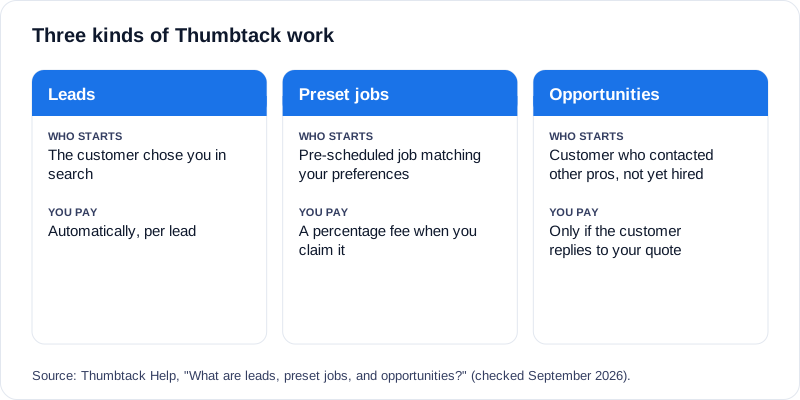
Thumbtack sends pros three kinds of work: leads, which are customers who chose to contact you from their search results and are paid for automatically; preset jobs, which are pre-scheduled jobs you claim for a percentage fee; and opportunities, which are customers who contacted other pros and have not hired anyone yet, where you pay only if the customer replies to your quote. This is how Thumbtack describes them in its own help center, as of September 2026.
The difference matters for one reason: on the first kind, you have already paid by the time you decide whether to reply. That is the case for answering fast, and for using a Thumbtack auto-responder when you cannot. The rest of this guide explains each type, when you are charged, what Thumbtack says about reply speed, and where automation helps and where it does not.
The three kinds of work on Thumbtack
- Leads. Customers who found you in their search results and chose to contact you directly. You receive them based on the job preferences you set. With “smart matching,” you may also receive leads slightly outside your preferences when Thumbtack’s AI predicts a strong fit. You pay automatically for a new lead, based on the lead prices you set, and your budget caps your total weekly spending. They appear in the For you tab of your Jobs page.
- Preset jobs. Pre-scheduled, unassigned jobs that match your preferences. The customer has already chosen a date and time, so you claim the job to add it to your schedule. Thumbtack says these are available to pros who offer specific services and meet certain criteria, such as having three or more reviews. There is no upfront cost; a percentage of the job price is kept as a fee, and you see your take-home before you claim.
- Opportunities (open leads). Customers who have reached out to other pros but have not hired anyone yet. They are not based on your job preferences. Sending a quote is free, and you are charged only if the customer responds to it. When they respond, the conversation moves to your Messages.
Thumbtack also labels leads so you can triage them: New (you have not seen it), Exact match (matches all your preferences), Smart Match (slightly outside your preferences), Paid (you already paid) and Only picked you (the customer has not contacted any other pro yet).
Who competes with you for a lead
On Thumbtack, customers browse pros in their search results and reach out to the ones they like, so a lead is a customer who already looked at your profile. That is why Thumbtack calls leads “your most efficient path to a hire.” It does not mean you are alone: the “Only picked you” label exists precisely because customers can contact several pros, and Opportunities are made of customers who reached out to others first. Speed still decides who gets the conversation; the evidence is in speed to lead statistics.
What Thumbtack says about reply speed
From Thumbtack’s help center:
- Aim to respond within four hours, between 8am and 8pm local time, and “the sooner the better.”
- Response rate affects your rank in search results, and responding quickly helps your rank so you are seen more often.
- Acting on each lead affects your response time even if you are not interested; decline jobs you will not take so the customer can keep looking.
- The Performance dashboard shows your response time and how you compare with competitors.
- Respond to leads before Opportunities, because you already paid for leads. The one-hour response rate behind Pro Rewards is explained in Thumbtack response time and Pro Rewards.
Thumbtack also offers a way to reply faster by hand: when you reply to a new lead, its AI can draft a reply “in seconds” from the customer’s request, which you send yourself, and you can save quick replies.
Why unanswered leads are the expensive ones
Because leads are paid automatically, an unanswered lead is money spent with no chance to win the job. A simple way to size it:
Wasted lead spend per month = unanswered leads × your average lead price.
An illustration, not our data: if 8 leads a month go unanswered and each cost $30, that is $240 for nothing, before counting the jobs you did not win. Opportunities are different: you only pay when the customer replies, so a slow response to an Opportunity costs you a chance, not a charge.
Where an auto-responder helps, and where it does not
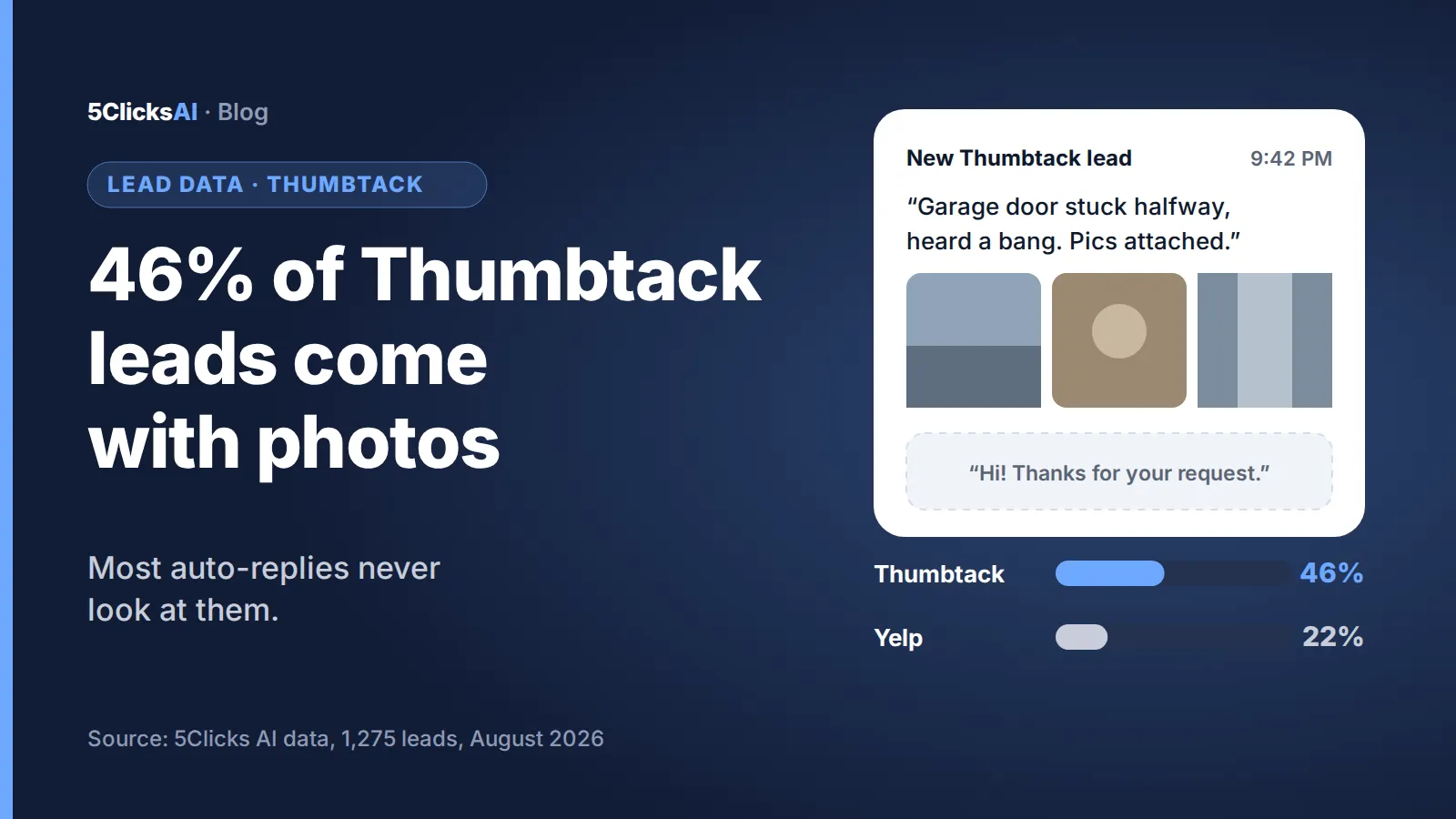
It helps on paid leads that arrive while you cannot reply: evenings, weekends and time on a job. 5clicks.ai connects to your own Thumbtack account, replies to a new lead within seconds, reads the photos the customer attached (46% of Thumbtack leads in our data of 1,275 leads, measured August 2026), works toward a direct phone number, and alerts you by text. With two-way call initiation on, we call you and connect you with the customer live. For a comparison with Thumbtack’s own tools, see Instant Reply vs an AI auto-responder.
It does not:
- change how Thumbtack ranks you. Thumbtack says response rate affects rank; a faster reply is behavior Thumbtack rewards, not a ranking tool we control.
- book the job or quote a price. It has no access to your calendar, so it never confirms a time slot.
- replace you. It keeps the customer engaged and hands the conversation over.
Frequently asked questions
Do I pay for every Thumbtack lead?
You pay automatically for leads, which are customers who chose to contact you, based on the lead prices you set. You do not pay to send a quote to an Opportunity; you are charged only if the customer responds.
What is an Opportunity on Thumbtack?
An Opportunity, also called an open lead, is a customer who has reached out to other pros but has not hired anyone yet. It is not based on your job preferences, and you pay only if the customer responds to your quote.
How fast does Thumbtack want me to respond?
Thumbtack advises responding within four hours between 8am and 8pm local time, and says faster is better. It also says response rate affects your rank in search results.
Does declining a lead hurt my response time?
Thumbtack says acting on each lead affects your response time even if you are not interested, and asks pros to decline jobs they will not take so the customer knows to keep looking.
Can an auto-responder reply to Thumbtack leads?
Yes. Tools like 5clicks.ai reply through your connected account and hand the conversation to you. Check Thumbtack’s current terms for your account, because we do not publish legal interpretations here.
People also ask
- What is the difference between leads and opportunities on Thumbtack? Leads come from customers who contacted you; opportunities are customers who contacted other pros and have not hired yet.
- What are Thumbtack preset jobs? Pre-scheduled jobs you claim, with a percentage fee instead of an upfront cost.
- What does “Only picked you” mean on Thumbtack? The customer has not contacted any other pro yet.
- Does Thumbtack response time affect ranking? Thumbtack says response rate affects your rank in search results.
- Is there an auto-reply on Thumbtack? Yes, a fixed message you write in advance; there are also quick replies and AI-drafted replies you send yourself.
Sources
- Thumbtack Help: What are leads, preset jobs, and opportunities?, How Thumbtack works, How to respond to leads and Here’s a guide to getting hired with your messages (checked September 2026)
- 5clicks.ai: lead photos data, 1,275 leads, measured August 2026
Try it on your own Thumbtack leads
Built by a marketing agency that’s run Yelp and Thumbtack for 5+ years. 5clicks.ai answers new Thumbtack leads day and night, reads the photos, and connects you with the customer.
Connect Thumbtack and watch it work on real leads →
Part of our guide: Thumbtack auto-responder for home-service businesses