In this article
- How is Yelp response time calculated?
- How is Yelp response rate calculated?
- What does Yelp not spell out?
- Where do customers see your response time?
- Does a faster response time get you more leads?
- What happens if you stop replying?
- How do you improve both numbers?
- What does an auto-responder change, and what does it not?
- FAQ
- Sources
Yelp response time is the median time you took to respond to new messages in the last 30 days, not including After Hours (6pm–8am). Response rate is the share of new messages you answered in the last 30 days. Yelp shows your reply speed on your business page, where customers see it before messaging you.
TL;DR
- Response time = median reply time, last 30 days, excluding 6pm–8am.
- Response rate = % of new messages you answered in the last 30 days.
- Yelp says businesses replying in under a day see 4x more requests (Yelp internal data, 2017).
- No reply within 7 days and no replies in 30 days: messaging is automatically disabled.
How is Yelp response time calculated?
In Yelp’s words, response time is “the median time you took to respond to new messages in the last 30 days, not including After Hours (6pm-8am)” (Yelp for Business Help Center).
Two words matter here. Median means one very slow reply will not wreck the number, but a habit of slow replies will. Last 30 days means it is a rolling window: improve this week and the number starts moving now. If you want the reply itself, see the three ways to answer a Request a Quote.
How is Yelp response rate calculated?
Response rate is “the percentage of new messages you responded to in the last 30 days, excluding messages that have just arrived to give you some time to respond” (same Help Center article).
| Metric | What Yelp measures | Window | Left out |
|---|---|---|---|
| Response time | Median time to reply to new messages | Last 30 days | After Hours, 6pm–8am |
| Response rate | % of new messages you replied to | Last 30 days | Messages that just arrived |
Yelp says it shows these numbers to consumers “to communicate how quickly and consistently you respond to messages.”
What does Yelp not spell out?
The definitions leave three questions open, and it is better to say so than to guess.
- Which clock does the After Hours exclusion apply to? The wording says After Hours (6pm–8am) is not included. It does not say whether that means messages that arrive in that window are skipped, or replies sent in that window are ignored. Check your own Yelp for Business dashboard after a week of testing rather than assuming.
- Does a decline count as a response? Request a Quote gives you three replies: send an estimate and availability, ask for more information, or mark the job as something you cannot service. Yelp does not say in the definition whether all three count toward the rate. Treat a decline as a reply to the customer either way.
- Is an automated reply treated differently? Yelp does not publish a distinction in these definitions.
Reply to Yelp quote requests in seconds, day and night 5clicks.ai replies to new Yelp requests and connects you with the customer.
See the Yelp auto-responder pageWhere do customers see your response time?
On your Yelp page. Yelp’s May 2025 guide for businesses says your response time “is also shown on your Yelp Page, so the faster you respond, the more attractive you look to prospective customers,” and gives the example that someone with an urgent issue is more likely to pick a business with a 20-minute response time than one with three hours (Yelp for Business). For an emergency plumber or a locksmith, that line can decide who gets the message.
Does a faster response time get you more leads?
Yelp says it does, with a caveat about its own data. On its quote-request help page: “Businesses with a response time of less than a day see 4x more requests than businesses who wait longer to reply.” The page footnotes this as Yelp internal data from 2017, so read it as directional, not as a current benchmark (Yelp for Business Help Center).
Yelp’s 2025 guide adds that customers are 2x more likely to respond when a pro replies within an hour and addresses the project details and questions, instead of just suggesting a call or linking to another form. The wider evidence on reply speed is in speed to lead statistics.
What happens if you stop replying?
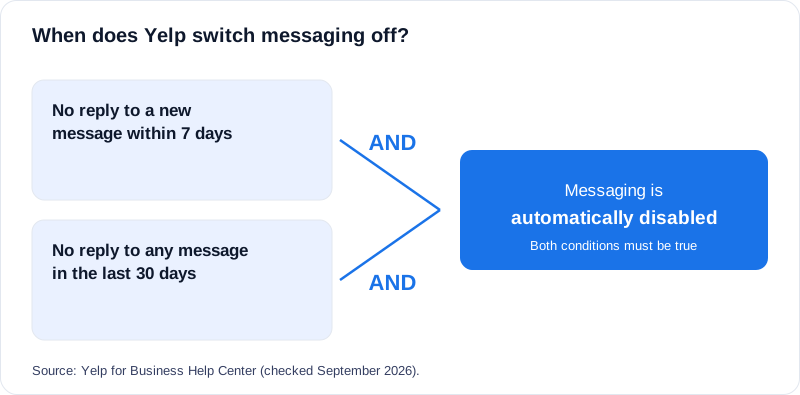
Yelp can switch messaging off. The rule, word for word: “If you do not reply within 7 days of receiving a new message and have not replied to any message in 30 days, messaging will be automatically disabled.” To re-enable it, you have to locate the unread messages and mark them as replied. Both conditions have to be true, so it hits pages that have gone quiet, not a business that missed one lead.
How do you improve both numbers?
- Get alerts on your phone. Yelp recommends the Yelp for Business app with push and email notifications turned on.
- Reply to the request, not with a template. Use the customer’s name and ask one or two questions specific to the job.
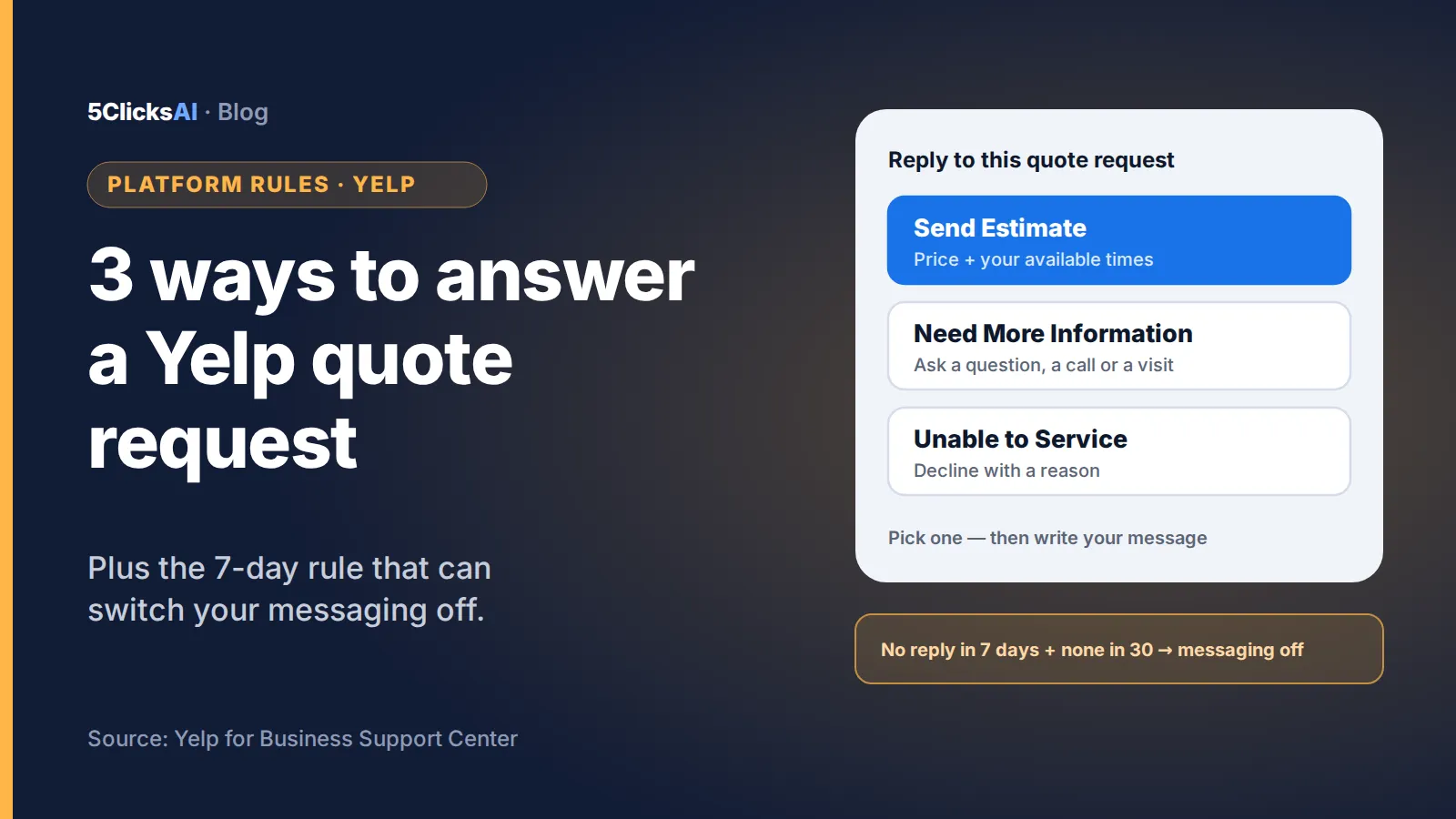
- Use the built-in reply types. Yelp offers Send an Estimate and Availability, Need More Information and Unable to Service. If you cannot take the job, say so rather than leaving it unanswered.
- Offer times, not “call me”. Yelp’s own guide suggests proposing specific dates and times.
- Check your numbers monthly. Both are 30-day windows, so a bad week shows up fast and fades fast.
What does an auto-responder change, and what does it not?
It can make sure every new message gets an immediate first reply, which is the behavior both metrics reward. It does not change how Yelp calculates them, does not change where Yelp ranks you, does not book the job or quote a price, and does not replace you. Whether and how a tool may reply for you is a separate question: check Yelp’s current rules for your account.
FAQ
Do messages at night count against my Yelp response time?
Per Yelp, response time does not include After Hours, 6pm–8am. Yelp’s help page does not say how a night message is timed once After Hours end.
How often does Yelp update response time and rate?
Both cover the last 30 days, so they move as older messages drop out of the window.
Why was messaging turned off on my Yelp page?
Yelp disables messaging automatically if you do not reply to a new message within 7 days and have not replied to any message in 30 days. It says you can restore it by finding the unread messages and marking them as replied.
Does declining a job count as a reply?
Yelp’s help page does not say. It does give you an Unable to Service option, which lets the customer know right away so they can move on.
What is a good Yelp response time?
Yelp does not publish a benchmark for a “good” median. Its own guidance links a response time under one day to 4x more requests (2017 internal data), but a customer comparing several businesses is usually looking at who answered first, so minutes matter more than the one-day line.
Sources
- Yelp for Business Help Center: How is the response time and response rate calculated for messaging my business?
- Yelp for Business Help Center: How do I respond to a quote request for my business?
- Yelp for Business: 4 tips for turning job requests into sales (May 13, 2025)
Quotes checked against the sources in September 2026. Platform rules change; we update this page when they do. Built by a marketing agency that’s run Yelp and Thumbtack for 5+ years.
Part of our guide: Yelp auto-responder for home-service businesses